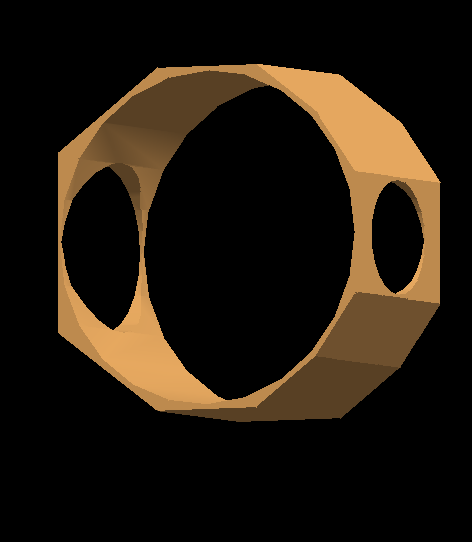
I am currently implementing the geometry of a component in my setup. I am doing this via gdml. I am attaching a screenshot of the component. I am obtaining it by performing boolean subtraction operations, starting from a cube and then cutting the circular holes and the edges.
However when i visualize the geometry i get this error, while the component is visualized properly:
BooleanProcessor: corrupted input polyhedron
Does this error have an impact on the simulation and tracking of particles through this component?
Please fill out the following information to help in answering your question, and also see tips for posting code snippets. If you don’t provide this information it will take more time to help with your problem!
The visualization can have problems with complex boolean hierarchies. Tracking generally will not, but tracking will be much slower, because some of the surface finding can’t be optimized the way it can for predefined solids.
With your solid, I have a few comments that you might find useful.
I can see a potential problem. On the left side, how much material is left at the “pinches” where the circular port is cut out? If you made the width equal to that diameter, those singular points are going to be problematic (as they would be to a real machinist!).
If the outside shape is a regular polyhedron, then you should just use {{G4Polyhedra}}, rather than subtracting from a {{G4Box}}.
If the outside shape is not a regular polyhedron, use {{G4ExtrudedSolid}}. The second constructor lets you give the half-height plus a list of 2D coordinates around the perimeter.
If you combine your three cylindrical cutouts into a {{G4MultiUnion}} (make the big central cylinder the first solid, so it shares the coordinate system with the polyhedron), you can subtract that from the polyhedron with a single step.
Doing things that will will be much more performant, and less likely to generate either visualization errors or vis artifacts.
The outside shape is not regular and this is why I didn’t go for a G4Polyhedra. I didn’t know about the G4ExtrudedSolid option, which ended to be the successful one. I am now able to get the component without BooleanProcessor errors.
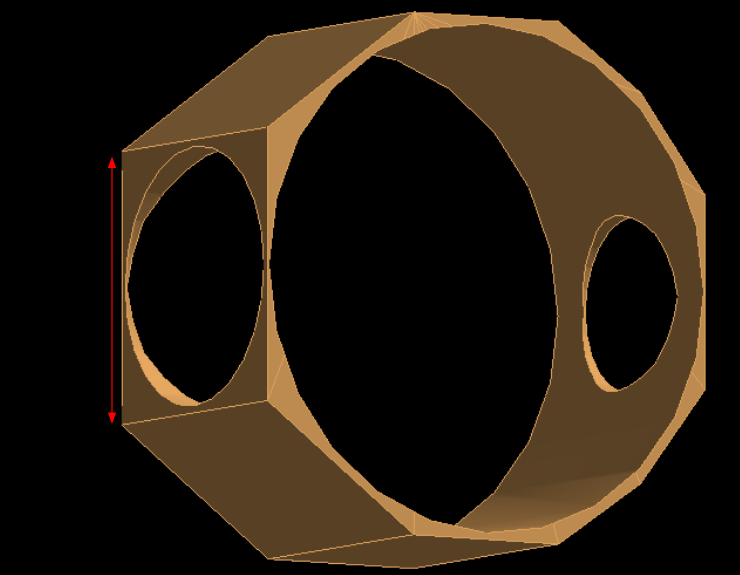
Concerning your point 1. If I understood properly, you were wondering if the red dimension in the screenshot (attached) was the same size of the diameter of the hole. As you can see, from this different perspective, is not.
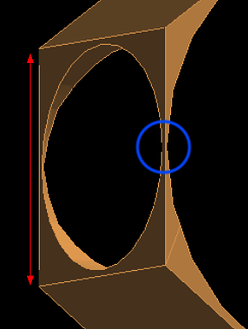
I’m glad that worked! I was actually questioning the perpendicular direction, where the two sides at the edge of the circular cutouts seem to come together at a point (I’ve circled it in blue below). I’d hate to have to machine that by hand, and not break it!
Ah sorry, yes indeed the distance between the hole and the edge is only 4 mm or so. But here I am kind of cheating because I am showing only a fragment of a bigger component that will be machined all together. In my simulation I was cutting this component into pieces.