Dear Geant4 community,
I have just installed Geant4 for the first time using Spack and followed the official installation guide.
The build itself finishes without errors and each example seems to compile and run correctly.
Problem:
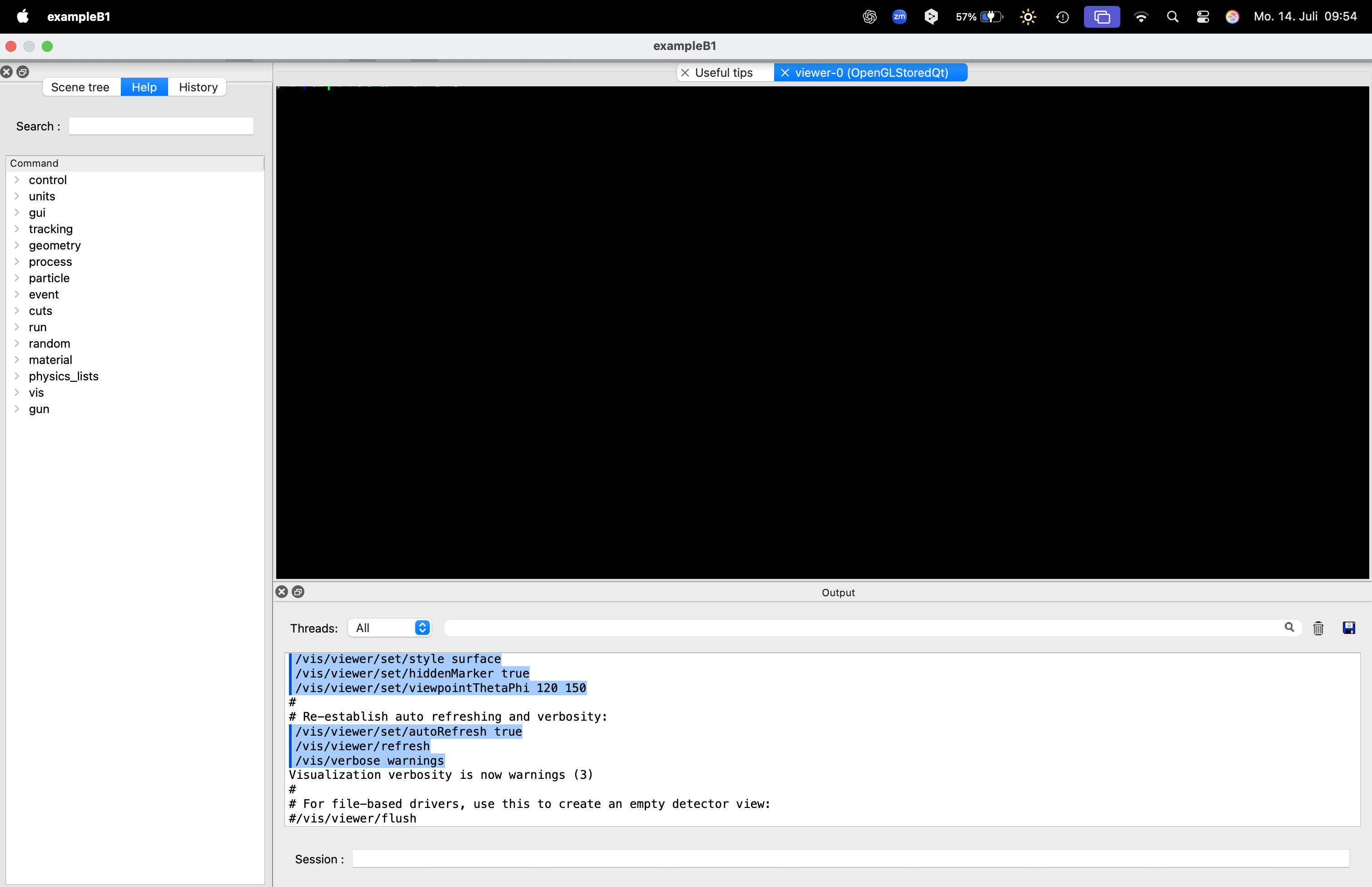
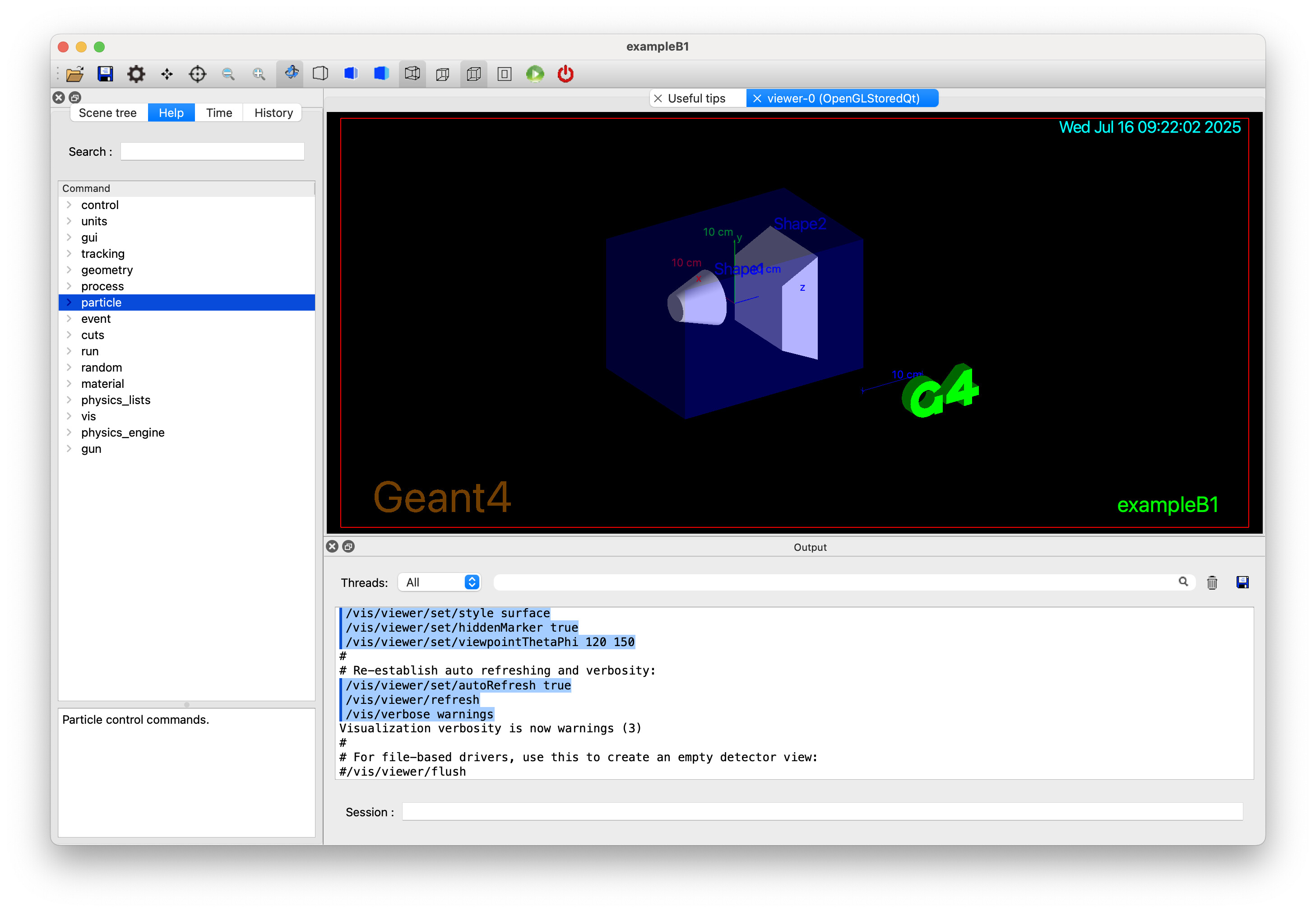
The OpenGL Qt viewer opens, but the main display area remains black in almost all examples.
In example B1 I only see a few coloured lines in the upper-left corner instead of the full geometry (see attached screenshots).
The terminal shows no warnings or errors. However, I have attached the terminal output below in case I am missing something.
I reproduced the issue on two separate Macs, so it does not seem to be a single-machine glitch.
What I tried
- Immediate vs. stored viewer/vis/open OGLIQt and /vis/open OGLSQt – both stay black.
- Camera reset and refresh/vis/viewer/reset, /vis/viewer/refresh – no change.
- Anti-aliasing off/vis/ogl/setAntiAliasing false – no change.
- Software OpenGL fallbackQT_OPENGL=software ./exampleB1 – still black.
- RayTracer backend – renders the geometry correctly (so the scene itself is fine).
Has anyone run into the same issue on Apple Silicon or knows a reliable workaround?
Any hints are greatly appreciated. I am happy to provide further logs or test patches.
Thank you very much for your help!
_Geant4 Version: 11.3.2
_Operating System: macOS Sequoia 15.5
_Compiler/Version: Apple clang version 17.0.0 (clang-1700.0.13.5)
_CMake Version: 4.0.3
# Visualization setting

/control/execute vis.mac

# Macro file for the visualization setting in the initialization phase

# of the B1 example when running in interactive mode

#

# Specify a viewer, e.g., /vis/open OGL, or allow a system choice:

/vis/open

Default graphics system is: OGL (based on build flags).

Default window size hint is: 600x600-0+0 (based on G4VisManager initialisation).

Note: Parameters specified on the command line will override these defaults.

Use "vis/open" without parameters to get these defaults.

/vis/sceneHandler/create OGL

/vis/viewer/create ! ! 600x600-0+0

Changing export format to "jpg"

/vis/viewer/refresh

# This chooses a graphics system (in order of priority):

# - by argument in G4VisExecutive construction.

# - by environment variable, G4VIS_DEFAULT_DRIVER.

# - by information in ~/.g4session.

# - by mode (batch/interactive) and if interactive, by your build flags.

# See "Choosing a graphics viewer" in the Application Guide for details.

# For example, with environment variable G4VIS_DEFAULT_DRIVER:

# The format is <graphics-system> [<window-size-hint>]. Set this, e.g:

# (bash) export G4VIS_DEFAULT_DRIVER=TSG

# (tcsh) setenv G4VIS_DEFAULT_DRIVER OI

# or on the command line, precede the app invocation, e.g:

# G4VIS_DEFAULT_DRIVER=Vtk ./<application-name>

# The window-size-hint can optionally be added, e.g:

# (bash) export G4VIS_DEFAULT_DRIVER="OGLSX 1000x1000-0+0"

# Other suggestions for G4VIS_DEFAULT_DRIVER (see list of registered

# graphics systems printed at the start):

# DAWNFILE: to create a .prim file suitable for viewing in DAWN.

# HepRepFile: to create a .heprep file suitable for viewing in HepRApp.

# VRML2FILE: to create a .wrl file suitable for viewing in a VRML viewer.

# "TSG_OFFSCREEN 1200x1200": to create an image file with TSG.

# See the tsg_offscreen.mac in examples/basic/B5 for more commands

# to change the file format, file name, picture size, etc.

# Disable auto refresh and quieten vis messages whilst scene and

# trajectories are established:

/vis/viewer/set/autoRefresh false

/vis/verbose errors

Visualization verbosity is now errors (2)

#

# Draw geometry:

/vis/drawVolume

/vis/scene/create

/vis/scene/add/volume world -1 -1 none m 0 0 0 0 0 0

/vis/sceneHandler/attach

#

# Specify view angle:

/vis/viewer/set/viewpointVector -1 0 0

/vis/viewer/set/lightsVector -1 0 0

#

# Specify style (surface, wireframe, auxiliary edges,...)

/vis/viewer/set/style wireframe

/vis/viewer/set/auxiliaryEdge true

/vis/viewer/set/lineSegmentsPerCircle 100

#

# Draw smooth trajectories at end of event, showing trajectory points

# as markers 2 pixels wide:

/vis/scene/add/trajectories smooth

/tracking/storeTrajectory 2

Attributes available for modeling and filtering with

"/vis/modeling/trajectories/create/drawByAttribute" and

"/vis/filtering/trajectories/create/attributeFilter" commands:

G4TrajectoriesModel:

Event ID (EventID): G4int

Run ID (RunID): G4int

G4SmoothTrajectory:

Charge (Ch): unit: e+ (G4double)

Track ID (ID): G4int

Initial kinetic energy (IKE): G4BestUnit (G4double)

Initial momentum magnitude (IMag): G4BestUnit (G4double)

Initial momentum (IMom): G4BestUnit (G4ThreeVector)

No. of points (NTP): G4int

PDG Encoding (PDG): G4int

Parent ID (PID): G4int

Particle Name (PN): G4String

G4SmoothTrajectoryPoint:

Auxiliary Point Position (Aux): G4BestUnit (G4ThreeVector)

Step Position (Pos): G4BestUnit (G4ThreeVector)

/vis/scene/notifyHandlers

/vis/modeling/trajectories/create/drawByCharge

/vis/modeling/trajectories/drawByCharge-0/default/setDrawStepPts true

/vis/scene/notifyHandlers scene-0

/vis/modeling/trajectories/drawByCharge-0/default/setStepPtsSize 2

/vis/scene/notifyHandlers scene-0

# (if too many tracks cause core dump => /tracking/storeTrajectory 0)

#

# Draw hits at end of event:

#/vis/scene/add/hits

#

# To draw only gammas:

#/vis/filtering/trajectories/create/particleFilter

#/vis/filtering/trajectories/particleFilter-0/add gamma

#

# To invert the above, drawing all particles except gammas,

# keep the above two lines but also add:

#/vis/filtering/trajectories/particleFilter-0/invert true

#

# Many other options are available with /vis/modeling and /vis/filtering.

# For example, to select colour by particle ID:

#/vis/modeling/trajectories/create/drawByParticleID

#/vis/modeling/trajectories/drawByParticleID-0/default/setDrawStepPts true

# To select or override default colours (note: e+ is blue by default):

#/vis/modeling/trajectories/list

#/vis/modeling/trajectories/drawByParticleID-0/set e+ yellow

#

# To superimpose all of the events from a given run:

/vis/scene/endOfEventAction accumulate

#

# Decorations

# Name

/vis/set/textColour green

/vis/set/textLayout right

/vis/scene/add/text2D 0.9 -.9 24 ! ! exampleB1

/vis/scene/notifyHandlers

# or, if your system does not support right-adjustment

#/vis/scene/add/text2D 0 -.9 24 ! ! exampleB1

/vis/set/textLayout

/vis/set/textColour

#

# Axes, scale, etc.

/vis/scene/add/scale

/vis/scene/notifyHandlers

/vis/scene/add/axes

/vis/scene/notifyHandlers

/vis/scene/add/eventID

/vis/scene/notifyHandlers

/vis/scene/add/date

/vis/scene/notifyHandlers

/vis/scene/add/logo2D

/vis/scene/notifyHandlers

/vis/scene/add/logo

/vis/scene/notifyHandlers

#

# Frame

/vis/set/colour red

/vis/set/lineWidth 2

/vis/scene/add/frame

/vis/scene/notifyHandlers

/vis/set/colour

/vis/set/lineWidth

#

# Attach text to one edge of Shape1, with a small, fixed offset

/vis/scene/add/text 0 6 -4 cm 18 4 4 Shape1

/vis/scene/notifyHandlers

# Attach text to one corner of Shape2, with a small, fixed offset

/vis/scene/add/text 6 7 10 cm 18 4 4 Shape2

/vis/scene/notifyHandlers

#

# To get nice view

# Make the "World" box invisible

/vis/geometry/set/visibility World 0 false

/vis/scene/notifyHandlers

# "Envelope" is transparent blue to represent water

/vis/geometry/set/colour Envelope 0 0 0 1 .3

/vis/scene/notifyHandlers

/vis/viewer/set/style surface

/vis/viewer/set/hiddenMarker true

/vis/viewer/set/viewpointThetaPhi 120 150

#

# Re-establish auto refreshing and verbosity:

/vis/viewer/set/autoRefresh true

/vis/viewer/refresh

/vis/verbose warnings

Visualization verbosity is now warnings (3)

#

# For file-based drivers, use this to create an empty detector view:

#/vis/viewer/flush

qt.qpa.fonts: Populating font family aliases took 39 ms. Replace uses of missing font family "Courier" with one that exists to avoid this cost. # Visualization setting

/control/execute vis.mac

# Macro file for the visualization setting in the initialization phase

# of the B1 example when running in interactive mode

#

# Specify a viewer, e.g., /vis/open OGL, or allow a system choice:

/vis/open

Default graphics system is: OGL (based on build flags).

Default window size hint is: 600x600-0+0 (based on G4VisManager initialisation).

Note: Parameters specified on the command line will override these defaults.

Use "vis/open" without parameters to get these defaults.

/vis/sceneHandler/create OGL

/vis/viewer/create ! ! 600x600-0+0

Changing export format to "jpg"

/vis/viewer/refresh

# This chooses a graphics system (in order of priority):

# - by argument in G4VisExecutive construction.

# - by environment variable, G4VIS_DEFAULT_DRIVER.

# - by information in ~/.g4session.

# - by mode (batch/interactive) and if interactive, by your build flags.

# See "Choosing a graphics viewer" in the Application Guide for details.

# For example, with environment variable G4VIS_DEFAULT_DRIVER:

# The format is <graphics-system> [<window-size-hint>]. Set this, e.g:

# (bash) export G4VIS_DEFAULT_DRIVER=TSG

# (tcsh) setenv G4VIS_DEFAULT_DRIVER OI

# or on the command line, precede the app invocation, e.g:

# G4VIS_DEFAULT_DRIVER=Vtk ./<application-name>

# The window-size-hint can optionally be added, e.g:

# (bash) export G4VIS_DEFAULT_DRIVER="OGLSX 1000x1000-0+0"

# Other suggestions for G4VIS_DEFAULT_DRIVER (see list of registered

# graphics systems printed at the start):

# DAWNFILE: to create a .prim file suitable for viewing in DAWN.

# HepRepFile: to create a .heprep file suitable for viewing in HepRApp.

# VRML2FILE: to create a .wrl file suitable for viewing in a VRML viewer.

# "TSG_OFFSCREEN 1200x1200": to create an image file with TSG.

# See the tsg_offscreen.mac in examples/basic/B5 for more commands

# to change the file format, file name, picture size, etc.

# Disable auto refresh and quieten vis messages whilst scene and

# trajectories are established:

/vis/viewer/set/autoRefresh false

/vis/verbose errors

Visualization verbosity is now errors (2)

#

# Draw geometry:

/vis/drawVolume

/vis/scene/create

/vis/scene/add/volume world -1 -1 none m 0 0 0 0 0 0

/vis/sceneHandler/attach

#

# Specify view angle:

/vis/viewer/set/viewpointVector -1 0 0

/vis/viewer/set/lightsVector -1 0 0

#

# Specify style (surface, wireframe, auxiliary edges,...)

/vis/viewer/set/style wireframe

/vis/viewer/set/auxiliaryEdge true

/vis/viewer/set/lineSegmentsPerCircle 100

#

# Draw smooth trajectories at end of event, showing trajectory points

# as markers 2 pixels wide:

/vis/scene/add/trajectories smooth

/tracking/storeTrajectory 2

Attributes available for modeling and filtering with

"/vis/modeling/trajectories/create/drawByAttribute" and

"/vis/filtering/trajectories/create/attributeFilter" commands:

G4TrajectoriesModel:

Event ID (EventID): G4int

Run ID (RunID): G4int

G4SmoothTrajectory:

Charge (Ch): unit: e+ (G4double)

Track ID (ID): G4int

Initial kinetic energy (IKE): G4BestUnit (G4double)

Initial momentum magnitude (IMag): G4BestUnit (G4double)

Initial momentum (IMom): G4BestUnit (G4ThreeVector)

No. of points (NTP): G4int

PDG Encoding (PDG): G4int

Parent ID (PID): G4int

Particle Name (PN): G4String

G4SmoothTrajectoryPoint:

Auxiliary Point Position (Aux): G4BestUnit (G4ThreeVector)

Step Position (Pos): G4BestUnit (G4ThreeVector)

/vis/scene/notifyHandlers

/vis/modeling/trajectories/create/drawByCharge

/vis/modeling/trajectories/drawByCharge-0/default/setDrawStepPts true

/vis/scene/notifyHandlers scene-0

/vis/modeling/trajectories/drawByCharge-0/default/setStepPtsSize 2

/vis/scene/notifyHandlers scene-0

# (if too many tracks cause core dump => /tracking/storeTrajectory 0)

#

# Draw hits at end of event:

#/vis/scene/add/hits

#

# To draw only gammas:

#/vis/filtering/trajectories/create/particleFilter

#/vis/filtering/trajectories/particleFilter-0/add gamma

#

# To invert the above, drawing all particles except gammas,

# keep the above two lines but also add:

#/vis/filtering/trajectories/particleFilter-0/invert true

#

# Many other options are available with /vis/modeling and /vis/filtering.

# For example, to select colour by particle ID:

#/vis/modeling/trajectories/create/drawByParticleID

#/vis/modeling/trajectories/drawByParticleID-0/default/setDrawStepPts true

# To select or override default colours (note: e+ is blue by default):

#/vis/modeling/trajectories/list

#/vis/modeling/trajectories/drawByParticleID-0/set e+ yellow

#

# To superimpose all of the events from a given run:

/vis/scene/endOfEventAction accumulate

#

# Decorations

# Name

/vis/set/textColour green

/vis/set/textLayout right

/vis/scene/add/text2D 0.9 -.9 24 ! ! exampleB1

/vis/scene/notifyHandlers

# or, if your system does not support right-adjustment

#/vis/scene/add/text2D 0 -.9 24 ! ! exampleB1

/vis/set/textLayout

/vis/set/textColour

#

# Axes, scale, etc.

/vis/scene/add/scale

/vis/scene/notifyHandlers

/vis/scene/add/axes

/vis/scene/notifyHandlers

/vis/scene/add/eventID

/vis/scene/notifyHandlers

/vis/scene/add/date

/vis/scene/notifyHandlers

/vis/scene/add/logo2D

/vis/scene/notifyHandlers

/vis/scene/add/logo

/vis/scene/notifyHandlers

#

# Frame

/vis/set/colour red

/vis/set/lineWidth 2

/vis/scene/add/frame

/vis/scene/notifyHandlers

/vis/set/colour

/vis/set/lineWidth

#

# Attach text to one edge of Shape1, with a small, fixed offset

/vis/scene/add/text 0 6 -4 cm 18 4 4 Shape1

/vis/scene/notifyHandlers

# Attach text to one corner of Shape2, with a small, fixed offset

/vis/scene/add/text 6 7 10 cm 18 4 4 Shape2

/vis/scene/notifyHandlers

#

# To get nice view

# Make the "World" box invisible

/vis/geometry/set/visibility World 0 false

/vis/scene/notifyHandlers

# "Envelope" is transparent blue to represent water

/vis/geometry/set/colour Envelope 0 0 0 1 .3

/vis/scene/notifyHandlers

/vis/viewer/set/style surface

/vis/viewer/set/hiddenMarker true

/vis/viewer/set/viewpointThetaPhi 120 150

#

# Re-establish auto refreshing and verbosity:

/vis/viewer/set/autoRefresh true

/vis/viewer/refresh

/vis/verbose warnings

Visualization verbosity is now warnings (3)

#

# For file-based drivers, use this to create an empty detector view:

#/vis/viewer/flush

qt.qpa.fonts: Populating font family aliases took 39 ms. Replace uses of missing font family "Courier" with one that exists to avoid this cost.