molecularDNA example: no DNA damage outputs or histograms after >72 hours when using monoenergetic C-12 ions

Please fill out the following information to help in answering your question, and also see tips for posting code snippets. If you don’t provide this information it will take more time to help with your problem!

Geant4 Version: 11.3.1
Operating System: Ubuntu 22.04
Compiler/Version: GCC 11.4.0
CMake Version: 3.22.1


Hello,

I’m trying to use the molecularDNA example to compute DNA damage caused by monoenergetic C-12 ions. I only modified the source definition in the human_cell.mac macro (no other parts were changed). My source settings are:

/gps/particle      ion
/gps/ion           6 12 6
/gps/pos/type      Volume
/gps/pos/shape     Ellipsoid
/gps/pos/centre    0 0 0 um
/gps/pos/halfx     9 um
/gps/pos/halfy     3.8 um
/gps/pos/halfz     9 um
/gps/ang/type      iso
/gps/energy        100 MeV

/run/beamOn 20

/gps/source/list

In addition, I run the example with the following script:

rm -rf build
mkdir build
cd build
cp -r “/home/hezi/Downloads/geometries” .
cmake ..
make -j128
./molecular -m human_cell.mac -t 128 -p 6
hadd -O -f molecular-dna.root molecular-dna_t\*.root
root
.X human_cell.C

When I execute the program with this script, it has been running for over 72 hours and I still do not get any DNA damage data or histograms. I would like to understand what might be wrong.

Hardware configuration:
CPU: AMD® Epyc 7542 32-core processor × 128
RAM: 256 GB

Could you please advise what could cause the lack of outputs in this setup, or if additional configuration is required to use C-12 ions with the molecularDNA example?

Thank you!
Hello,

G4DNA simulations can take a long time, especially with C12 ions as the number of secondaries produced are very large, and 72 hours is not too out of the ordinary depending on the number of primaries and their energy, however based on what you posted I suspect something is wrong.

By default the molecularDNA example outputs its progress fairly frequently, the first thing you should do is access that output and see what, if anything it is doing, but you are only running 20 events, so it might not reveal much.

You’re running the simulation with 128 threads, but the Epyc 7542 has 64 threads (2 threads per core). So when you give the command “./molecular -m human_cell.mac -t 128 -p 6” the program is trying to use 128 threads on a 64 thread CPU. This is a pretty big bottleneck for the CPU, as it is constantly halting and restarting processes (that are actually the same program). Unless you actually have two of these in a node, I would bet that this is the problem. Use the “top -H” command to see what the processes are doing, if you see a lot of processes that using a fraction of a CPU thread each, this is the cause. Also check the memory usage, although that should be more than ok with 256 GB, it doesn’t hurt to check. You say x128, which I assume means you have access to a HPC with 128 of these Epycs? When you run a Geant4 simulation it can’t operate between nodes, everything happens on the same chip (or two chips if its a 2 slot server). If you want to farm simulations off to multiple nodes you need to handle that through the job submission software (slurm, torque etc) and then collate the results somehow.

You also use 128 threads, but only run 20 particles. Threads can’t share particles, each threads looks after its own event loop ( Parallelism in Geant4: multi-threading capabilities — Book For Toolkit Developers 11.2 documentation ) and so this means that you only have 20 threads actually simulating one C12 ion and all of its secondaries each, and the rest are sitting idle. However because you presumably requested 128 threads on a 64 thread CPU, a lot of time is wasted by the OS getting the CPU to run what is essentially an idle simulation while the process that is actually simulating particles is waiting to be run.

Likely these two things are responsible for the long simulation time, but if you can clarify your hardware configuration, in particular how many threads per node, that would help. My advice would be to kill the simulation, and start small to get an idea of the time it takes. Start with electrons, vary their energy, move on to protons with a low energy, get an idea of how long they take with different energies, progress to alpha particles, then move on to C12 ions. Stick with 1 primary per thread at first, then increase.

1 Like

Hi @ctwhite — many thanks for your patient and detailed reply.

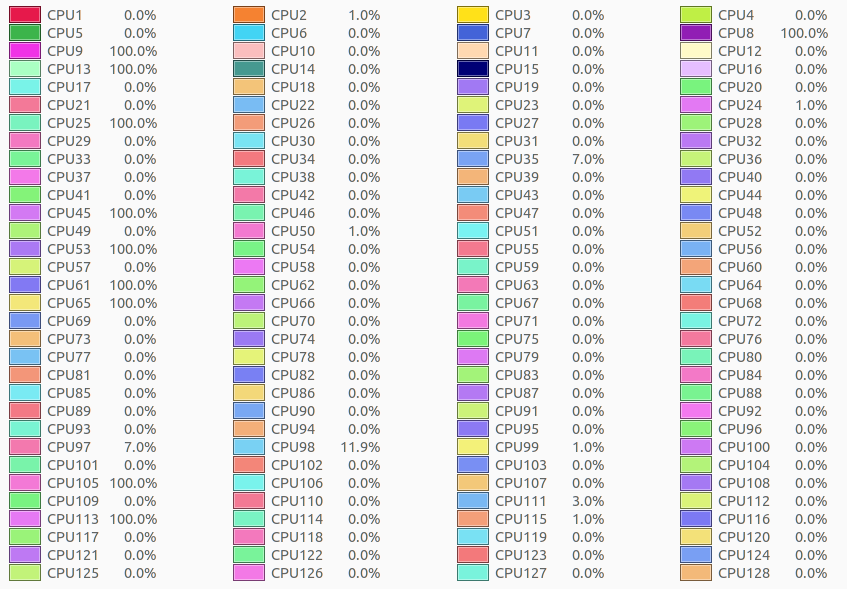
As you suspected, our machine is a dual-socket system with two AMD EPYC 7542 CPUs (32 cores / 64 threads each), for a total of 64 cores / 128 threads. That’s why I launched the job with -t 128. (See the attached screenshot.)

Regarding the small number of events: we intentionally used 20 events at 100 MeV C-12 because of memory pressure observed during test runs. With 40 events, the job was killed due to out-of-memory; with 30 events, peak memory reached 95.3%, so we chose 20 as a safer setting.

For context, we have successfully run the molecularDNA example with other primaries using the same source configuration (except for energy):

  • Electrons: 100,000 events
  • Protons: 400 events
  • Deuterons: 400 events
  • Alpha particles: 50 events

All of these produced DNA damage outputs and histograms, with wall times ranging from tens of minutes to tens of hours.

To give a complete picture of what we’re seeing with C-12, I’m attaching:

  • the full human_cell.mac we used,
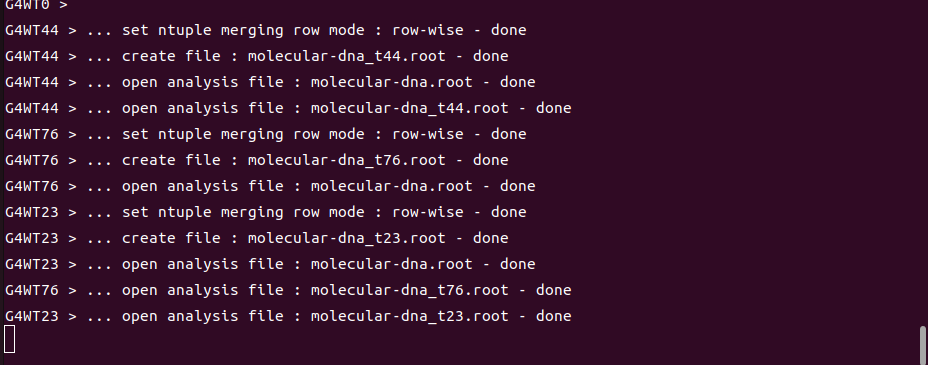
  • the terminal output printed during the run, and
  • the top -H process view.

As shown, the molecularDNA run appears to stall at the point indicated in the terminal output and stays there for a long time.

Thanks again for your help, @ctwhite. If you have further suggestions based on these details—e.g., settings specific to C-12 ions in molecularDNA, or any known pitfalls—your guidance would be greatly appreciated.

human_cell.mac.txt (2.8 KB)
terminal_molecularDNA.txt (378.2 KB)
terminal_process_view..txt (1.8 KB)

This topic was automatically closed 30 days after the last reply. New replies are no longer allowed.