Noobs using Geant4 for highschool IB project

Hi, I signed myself up to help my daughter set up with Geant4 so she can complete her high school IB project. She wants to use the moleculardna sample project to investigate/visualize how radiation affects cells. We tried building it on a Macbook (M2 cpu) but it crashed on anything but the simplest input, so now we want to try it on Windows 10 so I think Geant 4 11.2.x is the version we want. Before we continue, does anyone know if the moleculardna example compiles on Windows?

Thanks in advance,
Jeff

Hello Jeff,

These examples get tested; they (should) work an every OS so you are probably running into the same problems.
An operating system on it’s own is not the reason why Geant4 may crash.
So it’s easy to say works on my machine but this does not mean it works on yours if you are missing something.

Can you run a Basic example to confirm your installation of Geant4 is working?
Why does your moleculardna-example crash on your MAC?
Do you get any errormessage?
Did you build Geant4 with all needed dependencies for the moleculardna-example?
How did you build/install Geant4?

Regards
Max

Hi Jeff

Wow. OK. I have never tried moleculardna before (I assume you mean the example in examples/advanced/dna/moleculardna). I am using a MacBook Pro M2. I tried to build and run it ā€œout if the boxā€. It ran, but the graphics window was blank. I will look into it.

You say, ā€œit crashed on anything but the simplest inputā€. Not a lot to go on. How did you install it? What build options did you use? Could you say exactly what input? Were there any warning or error messages? Where exactly did it crash? Could you post the output log?

Have you tried simpler examples, such as examples/basic/B1?

moleculardna is, as it says, advanced. Most examples do something quite basic; they can be taken as a starting point, but to do anything useful usually requires some development, which needs C++ skills. Maybe you have studied the documentation (e.g., examples/advanced/dna/moleculardna/README) more than I, so know what it does, but it does sound a little ambitious to be starting with this.

I doubt whether changing to Windows will help.

John

The first error I got was

ERROR: G4VisCommandSceneAddVolume::SetNewValue:
  No world.  Maybe the geometry has not yet been defined.
  Try "/run/initialize"

so I added /run/initialize to the top of vis.mac - and /control/verbose 2 for good measure (to help debugging) - and then it said

ERROR: Volume "DNAWorld" not found.

It looks to me like moleculardna is currently not maintained as an ā€œout of the boxā€ example. Maybe @sincerti can help? SĆ©bastien?

Good luck
John

Hints: you may try to use moleculardna with our Linux Geant4 11.3 virtual machine for Windows (or macOS) : Geant4 Virtual Machine – G4VM with AlmaLinux 9 & Geant4 Release 11.3.2
and look at this tutorial to visualize small DNA fragments at page 24 (will not work with large geometries) : http://geant4-dna.in2p3.fr/tutorials/HandsOn-molecularDNA.pdf

Visualization will be easier to activate in the 11.4 release (next December)

Thank you, I’ll take a look at that tutorial tonight when I’m off work.

@MaxLoep @allison Thanks for your comments and I apologize for not being more clear. We did build G4 and the more basic examples from scratch and we were able to run them. We then built this moleculardna example successfully and was able to run a basic script with no issues, but with more complicated instructions, the simulation either crashed or hung.

I’ll read the tutorial that @ sincerti linked and if the problem persists I’ll post the output.

I doubt whether changing to Windows will help.

This is good enough for me to resume pursuing this on our macbook instead of redoing the whole thing on Windows, thanks!

@sincerti @allison ok my daughter is finally home from her vacation and we’ve resumed looking at this. I don’t know what I’m doing differently this time but I seem to be able to get past whatever error I was getting before. Now I can run

./molecular -m human_cell.mac -p 2 -t 2

and after a few minutes, I get a number of root files:

-rw-r–r-- 1 useruser staff 39241 Aug 7 20:28 molecular-dna_t2.root
-rw-r–r-- 1 useruser staff 39075 Aug 7 20:28 molecular-dna_t3.root

However when I run this

root human_cell.C

I see an empty Damage Quantification window, with this in the terminal window:

Processing human_cell.C…

/Users/useruser/Geant4/geant4-v11.3.0-projects/moleculardna/./human_cell.C:314:1: warning: declaration without the ā€˜auto’ keyword is deprecated: function ā€˜__cling_Un1Qu30’ [-Wdeprecated-declarations]

SD_SSBm = sqrt(((total_SSBm2 / number) - pow(total_SSBm / number,2))/(number -1));

^~~~~~~

auto

Info in : target file: molecular-dna.root

Info in : compression setting for all output: 101

hadd Source file 1: molecular-dna_t2.root

hadd Source file 2: molecular-dna_t3.root

hadd Target path: molecular-dna.root:/

hadd Target path: molecular-dna.root:/hists

hadd Target path: molecular-dna.root:/tuples

*** Break *** segmentation violation

[/usr/lib/system/libsystem_platform.dylib] _sigtramp (no debug info)

[] (no debug info)

[] (no debug info)

[] (no debug info)

[] (no debug info)

[/opt/homebrew/Cellar/root/6.36.02/lib/root/libCling.so] cling::IncrementalExecutor::runStaticInitializersOnce(cling::Transaction&) (no debug info)

[/opt/homebrew/Cellar/root/6.36.02/lib/root/libCling.so] cling::Interpreter::executeTransaction(cling::Transaction&) (no debug info)

[/opt/homebrew/Cellar/root/6.36.02/lib/root/libCling.so] cling::IncrementalParser::commitTransaction(llvm::PointerIntPair<cling::Transaction*, 2u, cling::IncrementalParser::EParseResult, llvm::PointerLikeTypeTraitscling::Transaction*, llvm::PointerIntPairInfo<cling::Transaction*, 2u, llvm::PointerLikeTypeTraitscling::Transaction*>>&, bool) (no debug info)

[/opt/homebrew/Cellar/root/6.36.02/lib/root/libCling.so] cling::IncrementalParser::Compile(llvm::StringRef, cling::CompilationOptions const&) (no debug info)

[/opt/homebrew/Cellar/root/6.36.02/lib/root/libCling.so] cling::Interpreter::EvaluateInternal(std::__1::basic_string<char, std::__1::char_traits, std::__1::allocator> const&, cling::CompilationOptions, cling::Value*, cling::Transaction**, unsigned long) (no debug info)

[/opt/homebrew/Cellar/root/6.36.02/lib/root/libCling.so] cling::Interpreter::process(std::__1::basic_string<char, std::__1::char_traits, std::__1::allocator> const&, cling::Value*, cling::Transaction**, bool) (no debug info)

[/opt/homebrew/Cellar/root/6.36.02/lib/root/libCling.so] cling::MetaProcessor::readInputFromFile(llvm::StringRef, cling::Value*, unsigned long, bool) (no debug info)

[/opt/homebrew/Cellar/root/6.36.02/lib/root/libCling.so] TCling::ProcessLine(char const*, TInterpreter::EErrorCode*) (no debug info)

[/opt/homebrew/Cellar/root/6.36.02/lib/root/libCling.so] TCling::ProcessLineSynch(char const*, TInterpreter::EErrorCode*) (no debug info)

[/opt/homebrew/Cellar/root/6.36.02/lib/root/libCore.so] TApplication::ExecuteFile(char const*, int*, bool) (no debug info)

[/opt/homebrew/Cellar/root/6.36.02/lib/root/libRint.so] TRint::ProcessLineNr(char const*, char const*, int*) (no debug info)

[/opt/homebrew/Cellar/root/6.36.02/lib/root/libRint.so] TRint::Run(bool) (no debug info)

[/opt/homebrew/Cellar/root/6.36.02/bin/root.exe] main (no debug info)

[/usr/lib/dyld] start (no debug info)

I know this is a crash (I’m a programmer) and I have no idea how I would go about debugging root, but before I investigate some more, do the previous steps and results look ok to you please?

Thanks in advance,
Jeff

Are you still attempting to run this on Mac or the virtual machine? Root has had on and off issues with Apple Silicon for years. This extremely recent github thread might point you to some relevant issue or discussions.

That workflow seems right for that example. It is possible there are missing or invalid pointers to root libraries.

Thanks for writing! We’re back to attempting this on our Mac. I installed root 6.36.02 via homebrew. Is that the same as Macports, which they reference in that thread?

ROOT versions based on 6.34.X all build and run just fine.

In meantime I’ll try downgrading to this

In meantime I’ll try downgrading to this

Ok so I couldn’t get older versions of root from homebrew so I bit the bullet and installed the Geant4 VM and built the moleculardna example, but now when I try to run

./molecular -m human_cell.mac -p 2 -t 2

it seems to run fine until the /run/initialize step, and then I get a generic ā€˜Killed’ message, with no .root files in the directory:

==========================================================================================

G4TaskRunManager :: Using G4ThreadPool…

Killed

Is there anywhere ( log files, etc) I can look to find out why the process is ending prematurely?

That seems suggestive of a memory issue. Two things to try off the bat:

  1. Set the number of threads to 1 to maybe eliminate multithreading as an issue.
  2. You can effectively create logs by sending the output to a file
./molecular -m human_cell.mac -t 1 > human_cell_output.log 2>&1

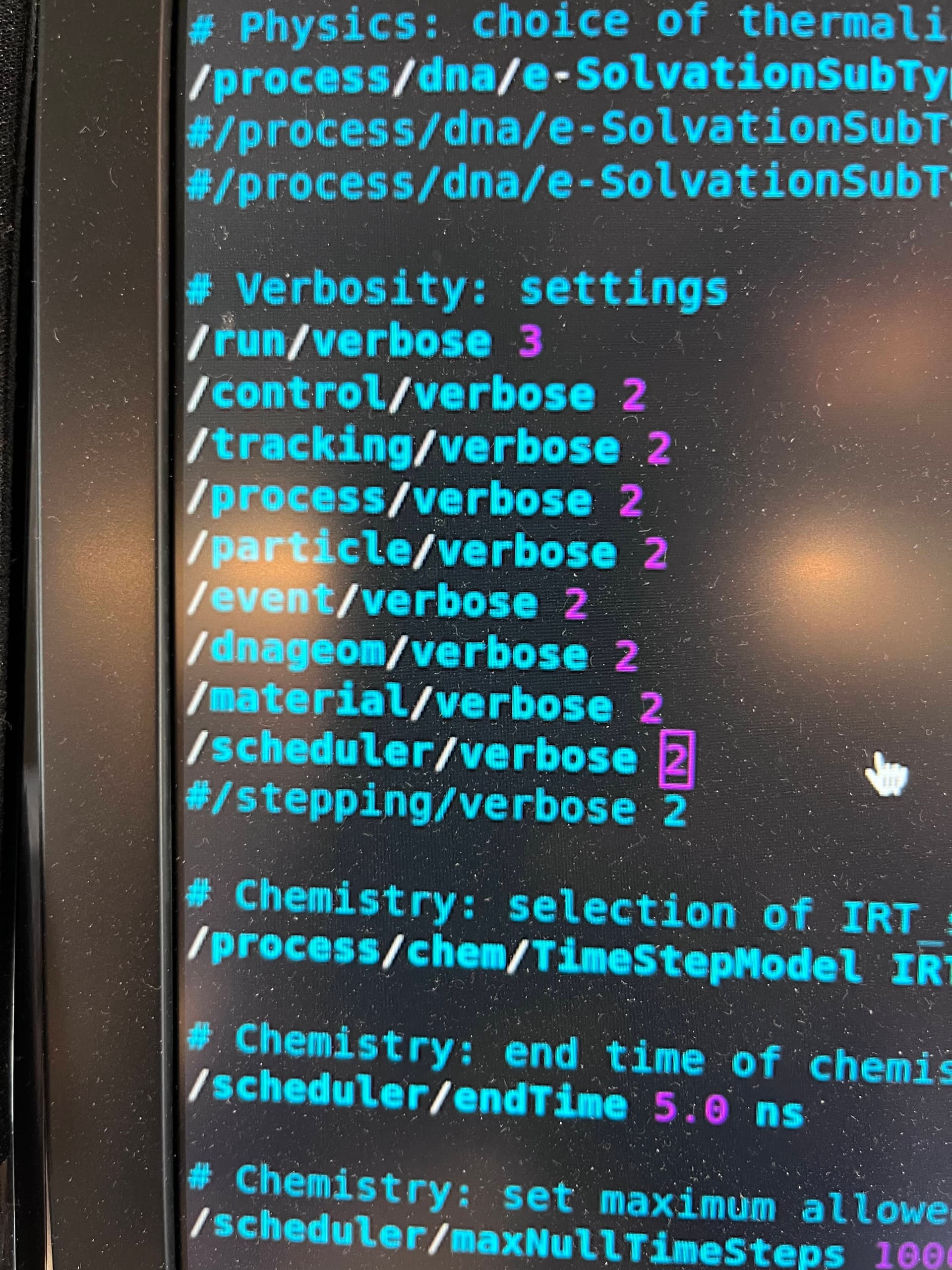
This is how the moleculardna.out file is generated. You can get very detailed information for helpful debugging by setting the verbosity higher in the macro:

/run/verbose 3
/control/verbose 2

I’d also add incrementally add:

/tracking/verbose 2
/stepping/verbose 2

These last two will give you a tremendously long output because of how often they are called. But it will be as detailed as anything that you could post here. You could try lower numbers as well. You just want to see if it even gets to the tracking or stepping actions. Do not increase the number of particles beyond 2, the file could get to be very large very fast.

1 Like

Hi Jeff

Just to be unhelpful!! :slight_smile: … Not sure why you’re having so much trouble. I run with vanilla Mac OS (Xcode) and pickup all else I need from homebrew, including cmake, Qt and ROOT (also VTK). cmake seems to know where they are. However, I don’t try to build with ROOT - one can create histograms and ntuples and write them out in ROOT format without actually linking to ROOT. I avoid X11 too.
But good luck in your endeavours!!

John

Hi John,

I understand and we definitely appreciate everyone’s help so far! I’m hoping the ā€œ-t 1ā€ and increased verbosity will shed some light on things :crossed_fingers::crossed_fingers:

The adventure continues!
I tried ā€œ-t 1ā€ but it didn’t seem to help.
I then set every verbosity setting I could find to 2:

But while it’s showing more info, it’s still not helpful quite yet:

Loading Voxel: turntwist
Wall placement
Wall placement
Killed

I noticed that the laptop we’re trying to run this on only has 8gb of memory. I’m gonna try this on our windows machine (in VM), which has 32gb

UPDATE 1: I gave my vm 30 gigs of ram and the example seems to run to completion, but running root still gives me a crash. Can someone confirm whether the sizes of these root files look correct please?

localhost.localdomain:/moleculardna_build < 173 >ls -al *.root
/home/local1/moleculardna_build
-rw-r–r–. 1 local1 admin 39489 Aug 15 21:55 molecular-dna_t0.root
-rw-r–r–. 1 local1 admin 39079 Aug 15 21:55 molecular-dna_t1.root

Hi @allison
I was wondering if my memory is indeed an issue. At first we were trying this on my daughter’s 8gb macbook, and then a 28gb VM in Windows 11. I was curious what amount of RAM you’ve run this on please?

Hi Jeff

I have 32 GB…but I don’t think memory’s the issue.

I eventually got around to studying the README file and tried their first suggestion:

./molecular -m cylinders.mac -t 2 -p 2

It ran quite quickly, producing two .root files (I have not inspected them).

Because I like running with the Qt GUI, I tried

./molecular -t 2 -p 2

(though I think ./molecular on its own will do, since -t 2 -p 2 is the default - see molecular.cc.)

and then

/control/execute cylinders.mac

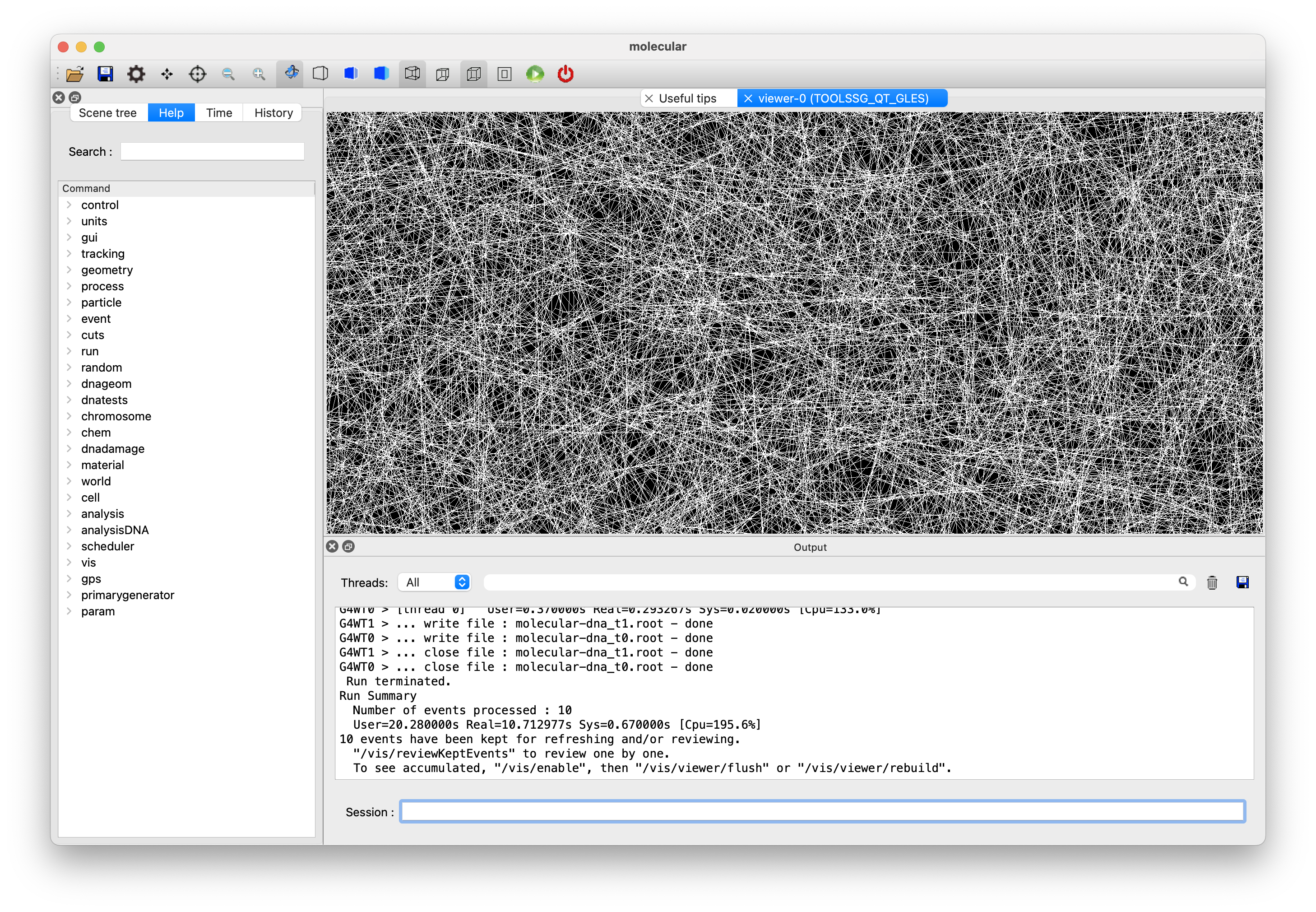
Again, it ran OK (took about 2 minutes), memory never rising above 1 GB, and eventually produced an image that looks like a spider’s web - see below. I think most of the memory and time would have been consumed in building the graphical database.

If you get this far, try

/vis/viewer/zoomTo 1

Next, I tried /tracking/verbose 2 and /run/beamOn 1. It produces an absolute mountain of output. It’s still going after 2 or 3 minutes on just the one event and consumed 22 GB before I killed it. The memory is being used by the GUI to store the output, ready to write to the output window when control passes back to the GUI at the end of run. So…not a great idea to set those verbose values.

Hope this gives you some clues. Let us know how you get on.

John

Yea, just tried running it this weekend and saw the same spike in memory. Those verbose options tend to generate very large outputs but this example tracks a lot during each step so that might have been expected. Hopefully being on a VM will also help with the root library issues.

This topic was automatically closed 30 days after the last reply. New replies are no longer allowed.