Please fill out the following information to help in answering your question, and also see tips for posting code snippets. If you don’t provide this information it will take more time to help with your problem!
Geant4 Version: 11.0.4
Operating System: windows 10 (64-bit)
Compiler/Version: MSVC (Visual Studio Build Tools 2022, MSBuild 18.0)
CMake Version: 4.1.1
Hello,
I am currently working on importing a TCAD structure into Geant4 using CADMesh. My workflow is:
-
Export geometry from TCAD as a .sat file
-
Convert the .sat file to .obj
-
Import the .obj file into Geant4 using CADMesh
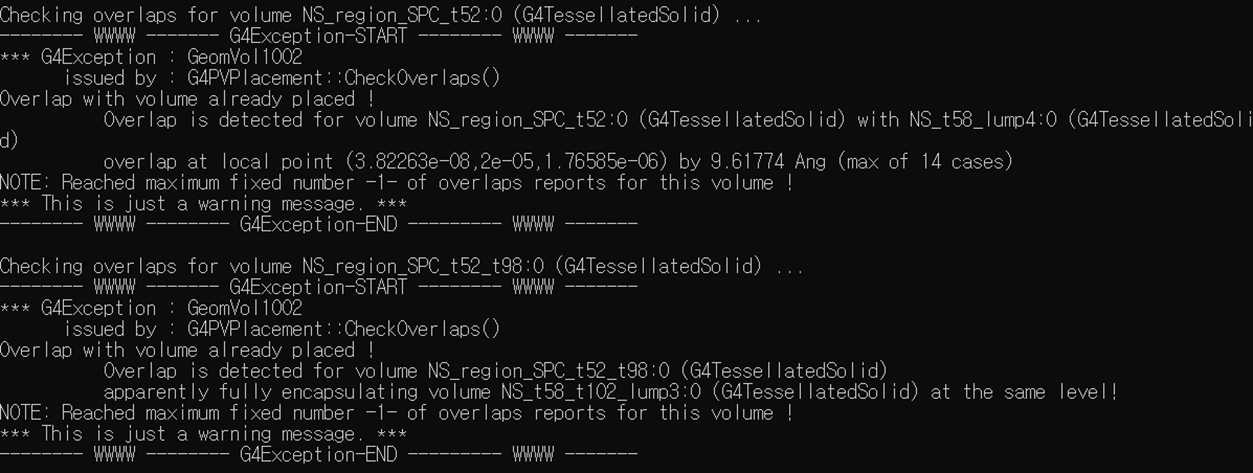
However, I am encountering the following warning messages from G4PVPlacement::CheckOverlaps().
The issue is that even when the geometries are visually not overlapping, Geant4 still reports overlap warnings.
I have two questions:
-
Why does Geant4 report overlaps even when the geometries do not actually overlap?
-
How can I resolve or suppress these warnings?
I suspect this might be related to:
-
tessellated geometry precision (from CADMesh)
-
floating-point tolerance
-
or the internal sampling method used by
CheckOverlaps()
Has anyone experienced a similar issue when importing CAD/TCAD geometries?
Any advice would be greatly appreciated.
Thank you!