Geant4 Version: 11.4.0
Operating System: Ubuntu 24.04.3 LTS
Compiler/Version: gcc 13.3.0
CMake Version: 3.28.3
Dear Geant4 users,
I am very new to Geant4 and I wish to understand how to use Geant4-DNA.
I have tried to code a very simple model : a sphere full of water with at its center a source of photo-electrons. I wish to record the ROS production. I think I succeed in retrieving all interactions, but I can’t manage to record the ROS. However, I checked some interactions have a deposited dose greater than 10-15 eV thus I think I should see some ROS. Here is an excerpt of the output obtained after simulation :
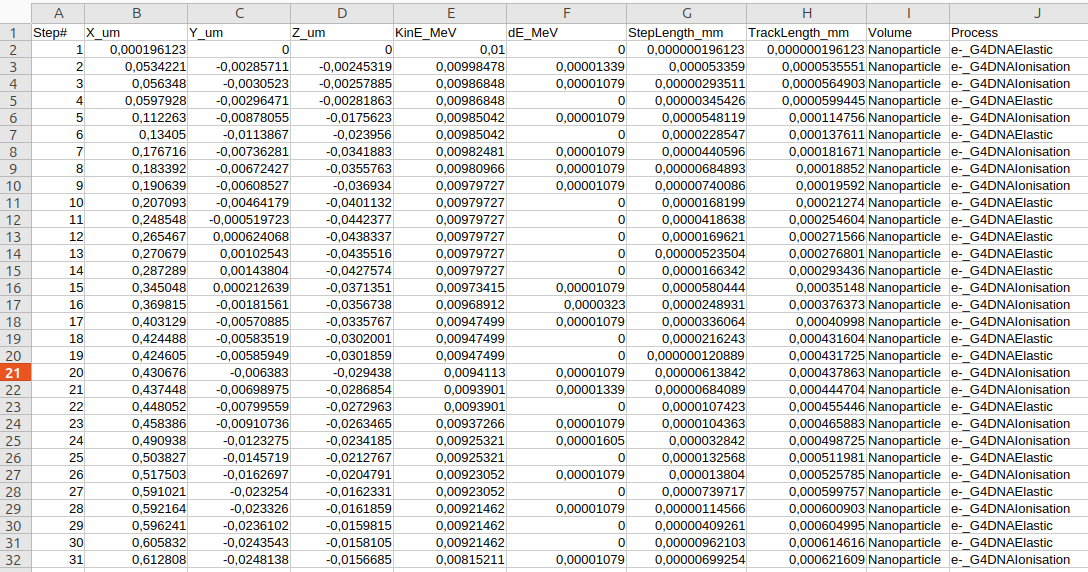
I’m not a physicist at all and I’m not very comfortable with Geant4 at the moment. Here is my code, if someone has an idea what the problem can be!
Thank you very much for the help,
Regards,
Sarah
DetectorConstruction.cc :
#include "DetectorConstruction.hh"

// --- Geant4 materials
#include "G4NistManager.hh"
#include "G4Material.hh"
#include "G4Element.hh"
#include "Materials.hh"

// --- Geant4 geometry
#include "G4Box.hh"
#include "G4Sphere.hh"
#include "G4LogicalVolume.hh"
#include "G4PVPlacement.hh"

// --- Visualization
#include "G4VisAttributes.hh"
#include "G4Colour.hh"

// --- Units
#include "G4SystemOfUnits.hh"

using namespace CLHEP;

DetectorConstruction::DetectorConstruction()
: G4VUserDetectorConstruction()
{}

DetectorConstruction::~DetectorConstruction()
{}

G4VPhysicalVolume* DetectorConstruction::Construct()
{
  // =========================================================
  // 1. MATERIALS
  // =========================================================
  // NIST manager gives access to predefined materials
  G4NistManager* nist = G4NistManager::Instance();

  G4Material* water = nist->FindOrBuildMaterial("G4_WATER");
  G4Material* air = nist->FindOrBuildMaterial("G4_AIR");
  G4Material* AGuIX = Materials::CreateAGuIX();


  // =========================================================
  // 2. WORLD VOLUME
  // =========================================================

  G4double worldSize = 20*um;

  G4Box* solidWorld =
    new G4Box("World",
              worldSize/2,
              worldSize/2,
              worldSize/2);

  G4LogicalVolume* logicWorld =
    new G4LogicalVolume(solidWorld,
                        air,
                        "World");

  G4VPhysicalVolume* physWorld =
    new G4PVPlacement(nullptr,
                      G4ThreeVector(),
                      logicWorld,
                      "World",
                      nullptr,
                      false,
                      0,
                      true);

  // =========================================================
  // 3. WATER SPHERE
  // =========================================================

  G4Sphere* solidSphere_inner_vesicle =
    new G4Sphere("WaterSphere",
                 0.0,
                 5*um,
                 0.0*deg,
                 360.0*deg,
                 0.0*deg,
                 180.0*deg);

  G4LogicalVolume* logicSphere_inner_vesicle =
    new G4LogicalVolume(solidSphere_inner_vesicle,
                        water,
                        "WaterSphere");

  new G4PVPlacement(nullptr,
                    G4ThreeVector(),
                    logicSphere_inner_vesicle,
                    "WaterSphere",
                    logicWorld,
                    false,
                    0,
                    true);

  // =========================================================
  // 3. NANOPARTICLE
  // =========================================================

  G4Sphere* solidSphere_NP =
    new G4Sphere("Nanoparticle",
                 0.0,
                 1*um,
                 0.0*deg,
                 360.0*deg,
                 0.0*deg,
                 180.0*deg);

  G4LogicalVolume* logicSphere_NP =
    new G4LogicalVolume(solidSphere_NP,
                        water,
                        "Nanoparticle");

  new G4PVPlacement(nullptr,
                    G4ThreeVector(),
                    logicSphere_NP,
                    "Nanoparticle",
                    logicSphere_inner_vesicle,
                    false,
                    0,
                    true);


  // =========================================================
  // 4. VISUALIZATION ATTRIBUTES
  // =========================================================


  auto worldVisAtt = new G4VisAttributes();
  worldVisAtt->SetVisibility(false);
  logicWorld->SetVisAttributes(worldVisAtt);

  auto sphereVisAtt = new G4VisAttributes(G4Colour(0.0, 0.0, 1.0, 0.2));
  sphereVisAtt->SetForceSolid(true); // force l'affichage en volume
  logicSphere_inner_vesicle->SetVisAttributes(sphereVisAtt);

  auto np_VisAtt = new G4VisAttributes(G4Colour(1.0, 0.0, 0.0));
  np_VisAtt->SetForceSolid(true);
  logicSphere_NP->SetVisAttributes(np_VisAtt);

  return physWorld;
}
PrimaryGeneratorAction.cc :
#include "PrimaryGeneratorAction.hh"

#include "G4ParticleTable.hh"
#include "G4ParticleDefinition.hh"
#include "G4SystemOfUnits.hh"
#include "G4ThreeVector.hh"
#include "Randomize.hh"

PrimaryGeneratorAction::PrimaryGeneratorAction()
{
    fParticleGun = new G4ParticleGun(1);

    // Photo-électron = électron
    auto particleDefinition =
        G4ParticleTable::GetParticleTable()->FindParticle("e-");

    fParticleGun->SetParticleDefinition(particleDefinition);

    fParticleGun->SetParticleEnergy(10*keV);

    fParticleGun->SetParticleMomentumDirection(G4ThreeVector(1,0,0));
}

PrimaryGeneratorAction::~PrimaryGeneratorAction()
{
    delete fParticleGun;
}

void PrimaryGeneratorAction::GeneratePrimaries(G4Event* event)
{
    G4ThreeVector position(0,0,0);
    fParticleGun->SetParticlePosition(position);

    fParticleGun->GeneratePrimaryVertex(event);
}
SteppingAction.cc :
#include "SteppingAction.hh"
#include "G4Track.hh"
#include "G4ParticleDefinition.hh"
#include "G4StepPoint.hh"
#include "G4SystemOfUnits.hh"
#include "G4ThreeVector.hh"
#include "G4VProcess.hh"
#include "G4PhysicalVolumeStore.hh"

SteppingAction::SteppingAction() {

    stepCounter = 0;

    outAll.open("steps_all.csv");
    outAll << "Step#,X_um,Y_um,Z_um,KinE_MeV,dE_MeV,StepLength_mm,TrackLength_mm,Volume,Process\n";


    outROS.open("ROS.csv");
    outROS << "Name,X_um,Y_um,Z_um,Time_ns\n";
}

SteppingAction::~SteppingAction() {
    if (outAll.is_open()) outAll.close();
    if (outROS.is_open()) outROS.close();
}

void SteppingAction::UserSteppingAction(const G4Step* step)
{
    stepCounter++;

    auto track = step->GetTrack();
    auto particle = track->GetDefinition();
    auto name = particle->GetParticleName();

    // Position
    G4ThreeVector pos = step->GetPostStepPoint()->GetPosition();

    // Energie cinétique
    G4double kinE = step->GetPostStepPoint()->GetKineticEnergy();

    // Energie déposée
    G4double dE = step->GetTotalEnergyDeposit();

    // Longueurs
    G4double stepLength = step->GetStepLength();
    G4double trackLength = track->GetTrackLength();

    // Volume
    auto vol = step->GetPreStepPoint()->GetTouchableHandle()
                   ->GetVolume()->GetName();

    // Processus
    auto proc = step->GetPostStepPoint()->GetProcessDefinedStep();
    G4String procName = proc ? proc->GetProcessName() : "init";

    // Filtre spatial si tu veux
    if (pos.mag() > 5.005*um) return;

    // === ECRITURE CSV ===
    outAll << stepCounter << ","
           << pos.x()/um << ","
           << pos.y()/um << ","
           << pos.z()/um << ","
           << kinE/MeV << ","
           << dE/MeV << ","
           << stepLength/mm << ","
           << trackLength/mm << ","
           << vol << ","
           << procName << "\n";
}
PhysicsList.cc :
#include "PhysicsList.hh"

#include "G4EmDNAPhysics.hh"
#include "G4EmDNAChemistry.hh"
#include "G4DecayPhysics.hh"
#include "G4UnitsTable.hh"
#include "G4SystemOfUnits.hh"

PhysicsList::PhysicsList()
{
    SetVerboseLevel(1);

    // === PHYSIQUE Geant4-DNA (e-, protons, ions, basse énergie)
    RegisterPhysics(new G4EmDNAPhysics());

    // === CHIMIE (diffusion + réactions ROS)
    RegisterPhysics(new G4EmDNAChemistry());

    // === Désintégration standard
    RegisterPhysics(new G4DecayPhysics());
}

PhysicsList::~PhysicsList() {}

void PhysicsList::SetCuts()
{
    // DNA ne dépend pas des cuts classiques
    SetCutsWithDefault();
}
main.cc :
#include "G4RunManager.hh"
#include "G4UImanager.hh"

#include "G4VisExecutive.hh"
#include "G4UIExecutive.hh"

#include "DetectorConstruction.hh"
#include "PhysicsList.hh"
#include "PrimaryGeneratorAction.hh"
#include "SteppingAction.hh"
#include "G4Scheduler.hh"
#include "G4DNAChemistryManager.hh"


int main(int argc, char** argv)
{
    // 1. Run manager
    auto runManager = new G4RunManager;

    // 2. Geometry
    runManager->SetUserInitialization(new DetectorConstruction());

    // 3. Physics (DNA + chimie)
    runManager->SetUserInitialization(new PhysicsList());

    // 4. Primary generator
    runManager->SetUserAction(new PrimaryGeneratorAction());

    runManager->SetUserAction(new SteppingAction());

    runManager->Initialize();

    // === ACTIVER LA CHIMIE ===
    G4DNAChemistryManager::Instance()->Initialize();
    G4Scheduler::Instance()->SetVerbose(1);

    // 5. Visualization
    auto visManager = new G4VisExecutive;
    visManager->Initialize();

    // 6. UI
    G4UIExecutive* ui = nullptr;
    if (argc == 1) {
        ui = new G4UIExecutive(argc, argv);
    }

    auto UImanager = G4UImanager::GetUIpointer();
    if (ui) {
        UImanager->ApplyCommand("/control/execute vis.mac");
        ui->SessionStart();
        delete ui;
    }

    // ---- WARNING : ne pas delete visManager/runManager ----
    // delete visManager;
    // delete runManager;

    return 0;
}